


Tetiana Khimich
Project Manager. «Webnauts Academy» administrator
Don’t make up your own problems. Make up happiness…
- An interface for creating, editing and deleting data for a specific game — it can be either the characters themselves, or their voices or entire dialogues;
- Visualization of statistical data — the transformation of a large amount of information into understandable and minimalistic graphs;
- Export — the ability to conveniently upload a large amount of data;
and much more.
The web application is intended for internal use, so SEO optimization and search robots, in our opinion, are not needed here. For the same reason, we also abandoned server-side rendering (SSR).
As a tool for implementing the frontend part, we used the Vue.js framework (namely, its 3rd version). The back-end part of the service was provided by the customer, so our developers were able to concentrate on front-end development, writing individual modules, components, and connecting the API.
Development process
First of all, we implemented user authorization based on access and refresh tokens. For this, Axios Interceptors, which check the token before executing the request, and Vue Router hooks, which check just before moving to another page, suited best . If the verification fails, the user will be returned back to the login page.

To visualize the data, we implemented a table with pagination, filters and sorting capabilities. Thanks to this, it is easier for the user to find the information they need in alphabetical order, by creation time and ID.
In addition, we implemented the ability to edit each record by going to a separate page or directly through the fields in the table. You can create and edit data both in the context of the selected filter, and at your own discretion.

Everyone loves minimalistically designed statistics, so we used a bar chart. The data dynamically changes when the date changes or any of the filters are switched.

The «Voice API» deserves special attention. It reproduces the written text with the voices of different characters. Thanks to this, for each of the created characters (an entry in the table), you can select a unique voice from the list, listen to it for a given phrase, or write your own text.

The main problem that we encountered when working with the «Voice API» is the delay. Because of this, the text entered from scratch was not transmitted immediately, as Temporal Games wanted. To solve this problem, we wrote middleware that checked the status of the server's response and waited for the end of the generation of the audio track.
Another interesting task that we faced during development is the implementation of data export. The thing is that the selection is data for each individual day, which are grouped monthly. Therefore, to increase convenience, we decided to add a new feature — placing data for the day in separate JSON files. After a month, they are archived and made available for download as a single zip file.

The result
While working with Temporal Games, we not only improved our own skills, but also enjoyed solving non-standard problems. As a result, we managed to create a classic single-page application (SPA) with extensive functionality and the possibility of further scaling. At the same time, customers received not only an attractive, but also a convenient product, written on the latest version of one of the most relevant Java Script frameworks of our time.
[post_title] => SPA Application on Vue.js for Data Management [post_excerpt] => [post_status] => publish [comment_status] => open [ping_status] => closed [post_password] => [post_name] => spa-application-on-vue-js-for-data-management [to_ping] => [pinged] => [post_modified] => 2023-09-17 15:49:00 [post_modified_gmt] => 2023-09-17 12:49:00 [post_content_filtered] => [post_parent] => 0 [guid] => https://wnauts.com/?post_type=project&p=10378 [menu_order] => 0 [post_type] => project [post_mime_type] => [comment_count] => 0 [filter] => raw ) [1] => WP_Post Object ( [ID] => 13463 [post_author] => 10 [post_date] => 2021-01-17 08:30:36 [post_date_gmt] => 2021-01-17 05:30:36 [post_content] =>About the project
Svetlana Shataeva is our regular client and practicing astrologer. We have already written about how we developed a website for the online school of astrology by Svetlana Shataeva and created a graphics package with zodiac signs.
We decided to dedicate this case to another voluminous block of our work, within which we developed a personal account for an online school, both for the course administrator and for ordinary users — course students.
Task
When developing a website for an online school of astrology, it became necessary to create a personal account for a course student. Moreover, it was necessary to develop two versions of the account: an admin panel (for a teacher) and a user one (for students). Accordingly, each option should perform a number of tasks, be as comfortable and visually pleasing as possible.
The solution
We decided to develop a personal account on the Django framework, a software framework written in the Python programming language. The Django framework has a wide range of capabilities and is suitable for developing complex sites and web applications, so it turned out to be especially relevant in our case.
It should be noted that the Django framework is actively used by world-famous companies. So, the largest video hosting YouTube — part of Google — is written on it. Google Search, DropBox, Instagram, Pinterest — these sites also use Django.
It is also important that Django is protected from common types of attacks, including XSS and CSRF attacks. Most known attacks are easily processed by the framework mechanisms, which means that Django developments are characterized by increased web security. The framework is great for sites and applications that work with intellectual property and copyrighted products.
Design and features of the student's PA
The first thing we did was to involve a designer in the project. Often, a personal account is a simple interface without any special graphical frills. But in order to maintain the corporate identity of the school, the personal account must correspond to it. Therefore, to develop it, we also used the talents of our designers — especially in relation to the student's personal account, because it will be the face of the school for many months of study.
Of course, we first developed a prototype and test design, which we agreed with the customer — and only after that we started to implement the task.
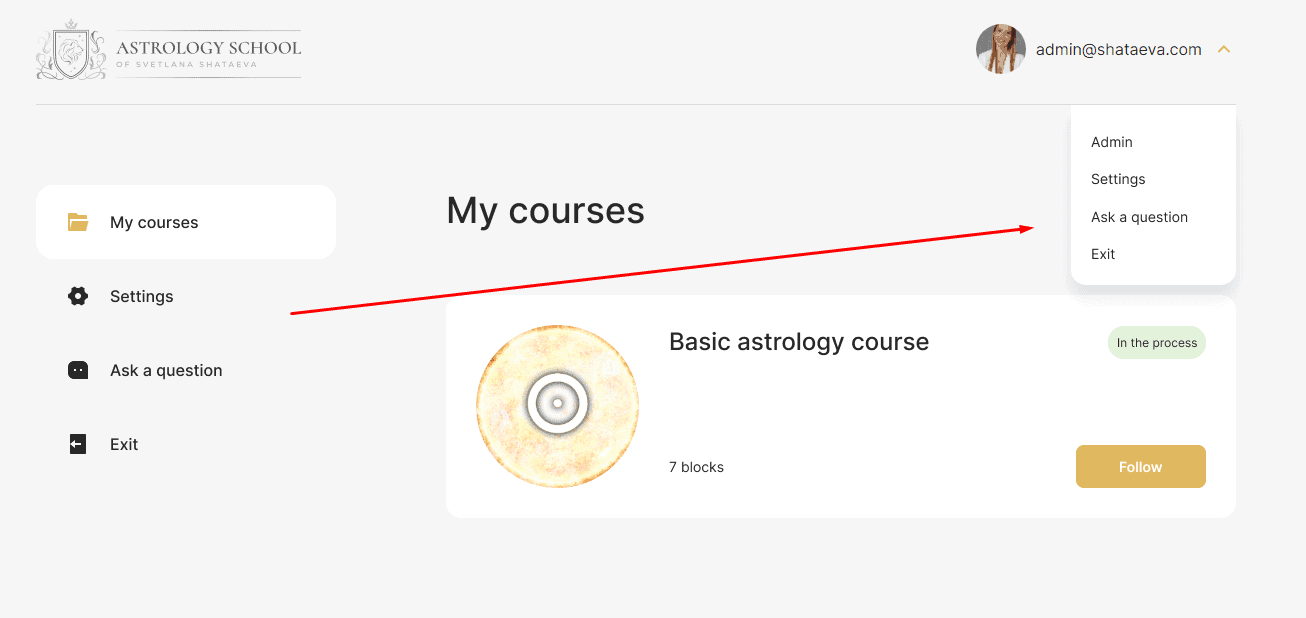
On the main page, the student immediately sees the course (one of three options, the purchase of which is available on the website of the online school). The course is divided into blocks, the content of which is corrected by the administrator in his personal account.
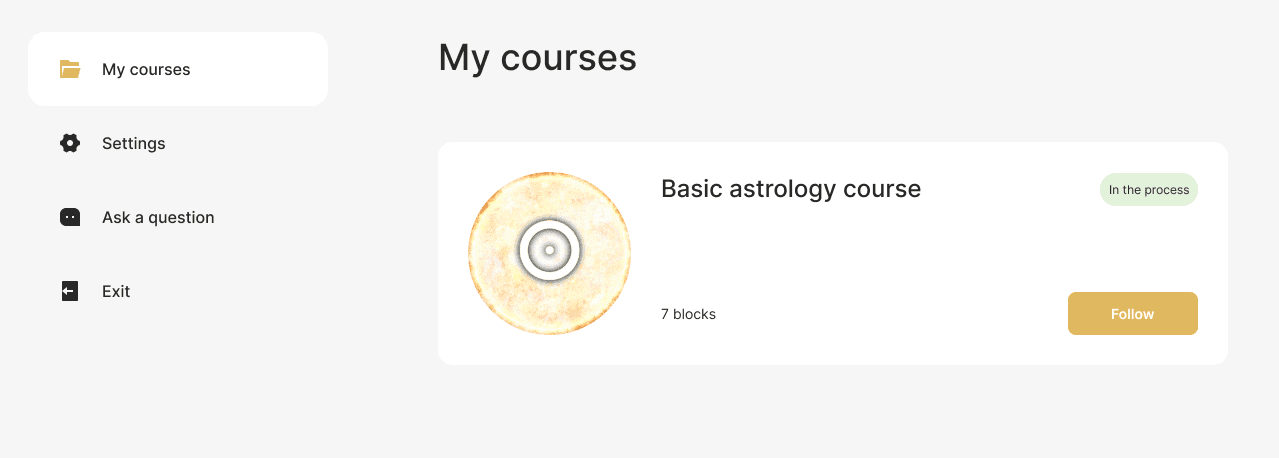

01
/ 02
In the zero block, students get acquainted with the instructions, the offer agreement, the schedule and can view the introductory webinar.
In the training blocks, students have direct access to the material for work. These are text and video lectures, webinars and other content at the discretion of the teacher.
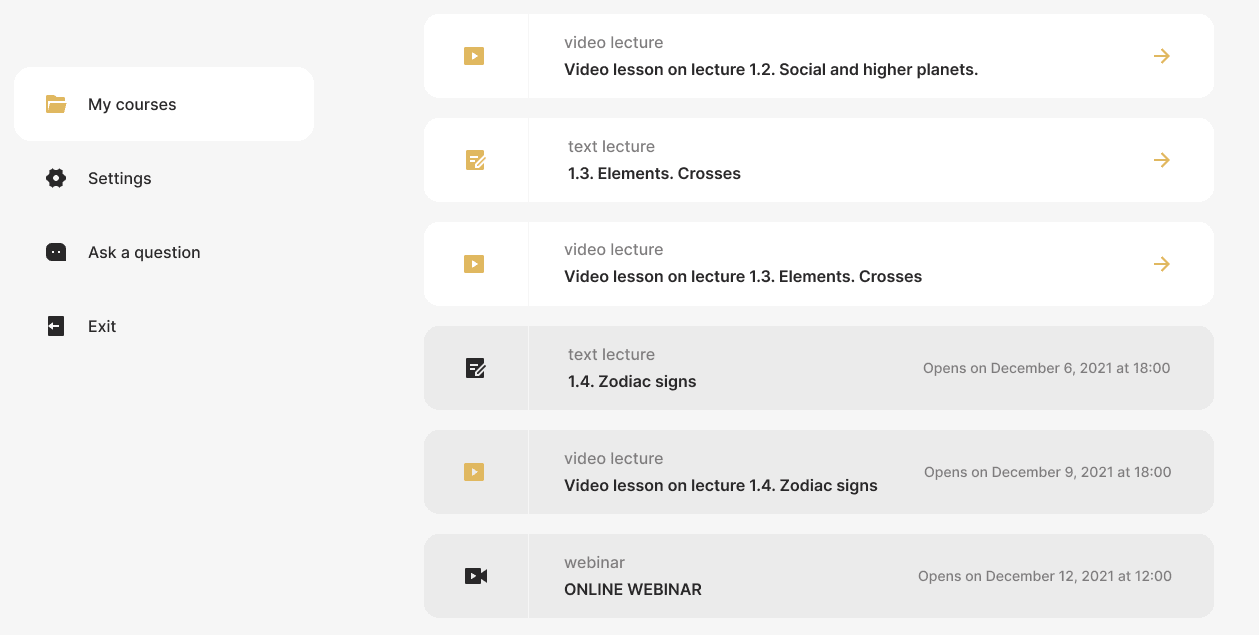
In blocks with lectures, it is also possible to download homework and a form for submitting already completed work - both a window for text and the ability to attach files are provided.

Students can also watch video lectures using the YouTube widget directly in their personal account.
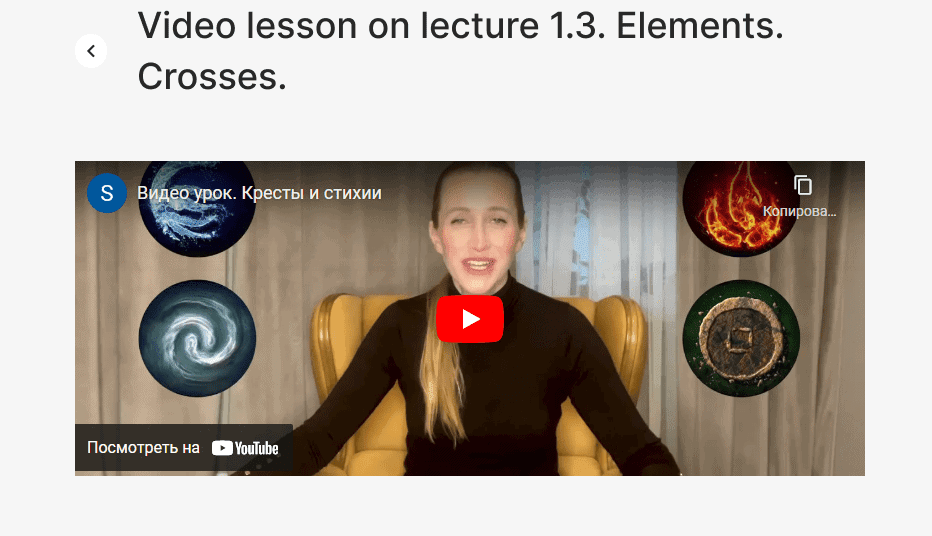
From the main page of the personal account, users can get to several other sections. One of them is «Settings», in which you can fill out a personal profile: add a photo, register an e-mail, or change your login password.

There is also an «Ask a question» tab to keep in touch with the teacher. It has a messenger in which you can exchange messages and attach files.
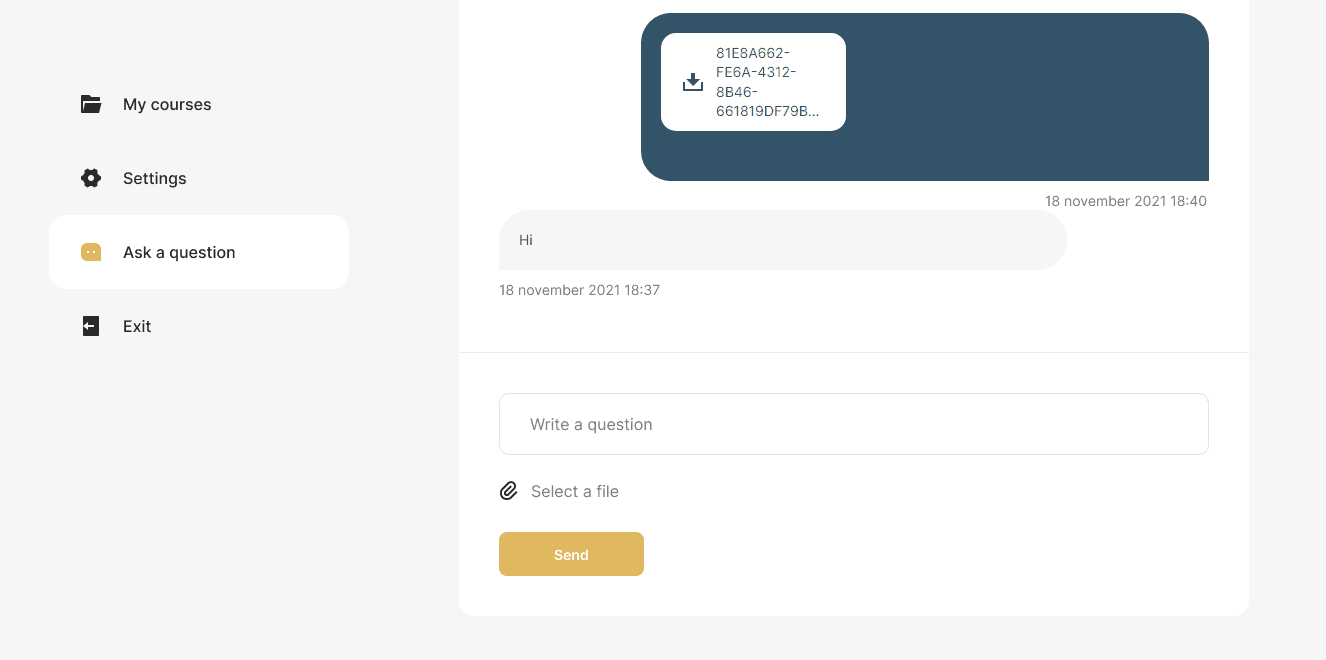
We also duplicated all three pages of the PA into a drop-down list that opens in the header of the personal account near the student's nickname.
Administrator (teacher) personal account: functional solutions
Getting into the «admin panel», the teacher gets full access to all the necessary functions and settings.
Access settings and homework
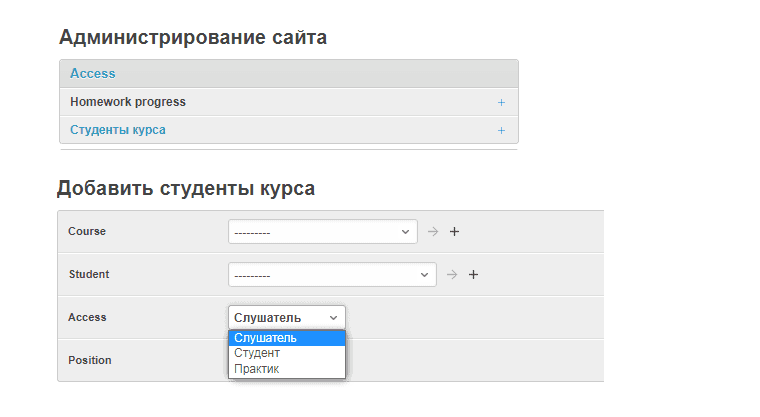
In the Access tab, you can open access to one of three rates for the course: «Listener», «Student» or «Practitioner».
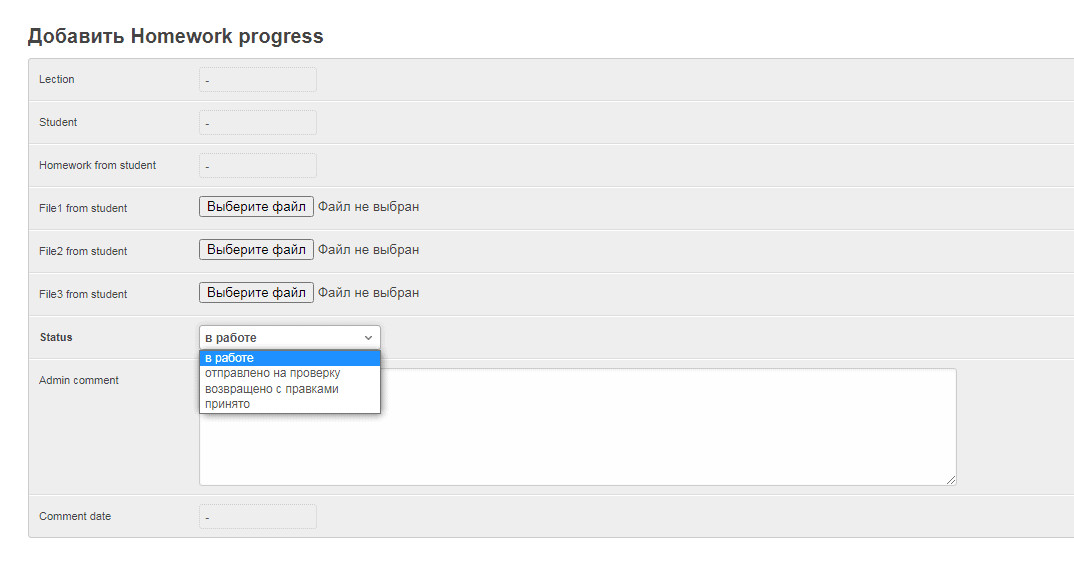
Here you can also create homework assignments with one of four statuses: «In progress», «Submitted for review», «Returned with revisions», and «Accepted». This solution allows you to do quality work on assignments without resorting to third-party resources and instant messengers — everything happens exclusively in the personal account.
User Chat
The Chat >> User chats tab allows the teacher to create a chat with a student of their choice. You can also attach files here.

Courses: Easy Administration
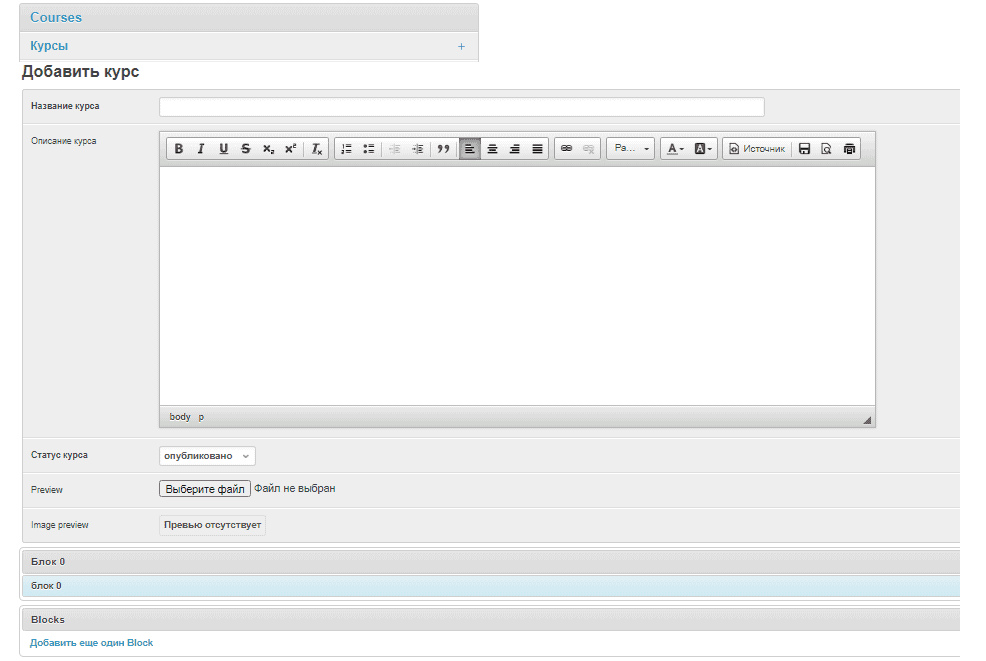
Another tab «Courses» was created to manage courses and information base. In just a couple of clicks, you can create a course — for this, an intuitive visual editor is provided with all the necessary buttons marked with familiar icons. It is possible to download Preview (preview) and add blocks.
In the «General data» tab, you can add materials that are not educational, for example, an offer agreement or instructions for purchasing a course program. These materials will be duplicated for different courses and will not need to be added again when creating a new course. It also provides a convenient visual editor. In the same section, you can add links to videos from YouTube and VIMEO video hosting sites or a link to a ZOOM webinar.
For example, adding the offer text in the teacher's account looks like this:

This is how the finished material is displayed in the student's account:
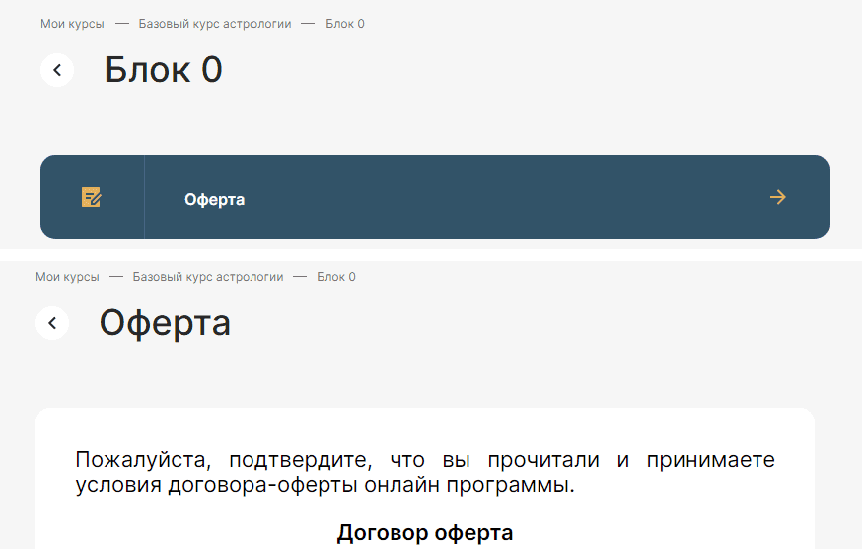
And in the «Students» tab, all the necessary data about the students of the course is stored.

«My Actions»: Safety and Convenience
In a separate column, we took out the history of actions in the teacher's personal account. This not only allows you to control the possibility of unauthorized access to course materials, but also, if necessary, will remind the administrator where he left off while working in the account.

Summary
As you can see, the possibilities of the Webnauts team are very wide if not unlimited. We are able to «speak» various programming languages and use them to achieve different goals and solve even the most complex technical problems. The development of a personal account for a teacher and a student for an online school of astrology is irrefutable proof of this. The first students are already evaluating the quality of our work, and we are ready to help create and set up a similar training system for other clients.
[post_title] => Student's Personal Account for Online School [post_excerpt] => [post_status] => publish [comment_status] => open [ping_status] => closed [post_password] => [post_name] => students-personal-account-for-online-school [to_ping] => [pinged] => [post_modified] => 2023-09-18 10:13:14 [post_modified_gmt] => 2023-09-18 07:13:14 [post_content_filtered] => [post_parent] => 0 [guid] => https://wnauts.com/?post_type=project&p=13463 [menu_order] => 0 [post_type] => project [post_mime_type] => [comment_count] => 0 [filter] => raw ) [2] => WP_Post Object ( [ID] => 16157 [post_author] => 10 [post_date] => 2022-08-26 14:02:16 [post_date_gmt] => 2022-08-26 11:02:16 [post_content] =>A task
Enercor, an international consulting company specializing in the management and restructuring of inefficient enterprises, approached us with the task of developing a corporate website. At the time of the request, the client already had a desktop website design with infoblocks reflecting:
- mission and benefits,
- the range of services provided,
- team composition and completed projects,
- news, vacancies and company contacts with an application form for consultations.
What we had to do was the development — to breathe life into the project and present a modern, functional and adaptive website to the client. Read about how we did it in our case.

Technological solutions
When developing the site, we used CMS WordPress — one of the most popular platforms. It is good because in the future the client will be able to easily manage the content of the site: add web pages and place text, images and videos even without the help of a developer. WordPress also allows you to scale the site in the future — for example, add a blog or other additional features.
Website coding
Our front-end developer was faced with the task of turning images into code using HTML, CSS (using the SCSS syntax of the Sass preprocessor) and JS. In his work he also used one of the modern coding techniques — Grid. What is it? Grid coding allows you to create responsive pages for any type of device and position elements on the site correctly — text, photo, video, or any other HTML block.

The implementation of modal windows on the Projects page was interesting: when you click on a case, an easy-to-read card with information appears on the screen:

The task of bringing web pages to life with the help of animations was also fascinating. For example, when scrolling the page, the slightest movement of the mouse or touching the touchpad, you can get really carried away with the original effect of the cursor following. The decorative airdrop cursor was implemented using the GSAP JavaScript library, or GreenSock Animation Platform, a popular scripted web animation toolkit:

Front-end development took 170 hours, including edits from the client. To speed up the work and competently prepare the project for release, our front-end developer used the Gulp project assembler, a tool for automating tasks (minification, testing, file merging, etc.), written in the JavaScript programming language.
Website functionality
The development of the server part of the site took 126 hours. In the course of the work, a complex structure of transitions between sections was implemented through many anchor and simple internal links. This means that when clicking on the link, the user goes not only to the desired page, but also to a part of it that is relevant in meaning:

Thus, the Services section reflects the company's activities with links to separate pages, where each service is described in more detail:

On the services page, there is an Expertise block with a list of key areas in which the company specializes. Paragraphs of the same name in the description of the expertise of each team member also lead to this block. In the future, the client plans to link these points also with specific projects of the company.

The Projects section is a catalog of completed projects of the company of 2 types: with brief information presented as a card and with a full description of the case in the form of a separate web page:

The Team section presents all team members with a photo, a short description, expertise and a link to the city. Clicking on one of the cards takes the user to a page with more detailed information, which contains a link to the LinkedIn profile and a list of financial and economic publications where experts have been published:

The Vacancies section contains the company's job offers, as well as a form which enables to send a resume even if there are no vacancies:

The News section of the site displays publications as a gallery, loaded from the company's profile on LinkedIn. The ability to embed this type of content on the site was implemented using the Tagembed social media aggregator:

The Contacts section contains the contact details of the company and a convenient form for contacting a specific representative office:

In order to expand the capabilities of the site, the following popular WordPress plugins were used:
- Yoast SEO is a SEO management tool that helps visitors and search engines get the most out of your site.
- ACF (Advanced Custom Fields) — for full control over edit screens and custom field data.
- CF7 (Contact Form 7) — for managing contact forms on the site and flexible configuration of the content of forms and mail.
- WP Mail SMTP — to fix email deliverability issues via SMTP (Simple Mail Transfer Protocol) - the industry standard for sending emails.
To protect the site from spam, reCAPTCHA v3 technology was used, installed through an extension from the above-mentioned CF7 plugin.
In addition to the catalog of plugins, WordPress has ample opportunities for customization — flexible site customization for client requests: changing the layout, adding various options, etc. So, our backender additionally created:
- custom post types for Team and Projects sections;
- custom taxonomies for the Services section, which in turn is linked to the Projects section, and for the cities block linked to the employees of the Team section.
As a result, the client can independently change the visual elements of the site: the order of menu items, the order of blocks, projects, team members, etc.
By the way, remember our amazing decorative cursor? The client could not decide on its color for a long time, so the developer added a color palette for the cursor to the admin panel. Now the client will be able to manage its appearance independently, without the help of a programmer.
Responsiveness
As we wrote earlier, Enercor came to us with desktop layouts. Therefore, our frontender also took care of the convenience of the visitors of the future site, intelligently adapting layouts for mobile devices. If you visit the site from a smartphone or tablet, then you will see that it will be as convenient to perceive text and visual information as it is from a computer screen.

Presentation of the company
Another task, this time for the design department, was the presentation of Enercor. The visual design is fully consistent with the corporate identity of the company: colors, fonts and corporate symbols are consistent. 28 slides are full of peculiar elements in the form of neural networks, and the entire array of information is conveniently and clearly structured. The business tone of the narrative is softened by unobtrusive animation that will capture and hold the attention of the audience:

Results
The completed Enercor project and our experience in developing a corporate website for consulting services on WordPress proves once again that the web site of an international consulting company can be fun and harmoniously combine serious information with smooth animation and captivating decorative elements. Add to that a structured animated presentation and you have another powerful marketing tool.
[post_title] => Corporate Website of an International Consulting Company [post_excerpt] => [post_status] => publish [comment_status] => open [ping_status] => closed [post_password] => [post_name] => corporate-website-of-an-international-consulting-company [to_ping] => [pinged] => [post_modified] => 2023-09-17 16:01:06 [post_modified_gmt] => 2023-09-17 13:01:06 [post_content_filtered] => [post_parent] => 0 [guid] => https://wnauts.com/?post_type=project&p=16157 [menu_order] => 0 [post_type] => project [post_mime_type] => [comment_count] => 0 [filter] => raw ) [3] => WP_Post Object ( [ID] => 15789 [post_author] => 10 [post_date] => 2022-07-24 16:25:54 [post_date_gmt] => 2022-07-24 13:25:54 [post_content] => [post_title] => Investment Company Landing Page [post_excerpt] => [post_status] => publish [comment_status] => open [ping_status] => closed [post_password] => [post_name] => investment-company-landing-page [to_ping] => [pinged] => [post_modified] => 2023-09-14 16:59:44 [post_modified_gmt] => 2023-09-14 13:59:44 [post_content_filtered] => [post_parent] => 0 [guid] => https://wnauts.com/?post_type=project&p=15789 [menu_order] => 0 [post_type] => project [post_mime_type] => [comment_count] => 0 [filter] => raw ) )Worked on
-

SPA Application on Vue.js for Data Management
-
Team:
4
-
Cases:
0
-
Reviews:
0
-
-

Student’s Personal Account for Online School
-
Team:
3
-
Cases:
0
-
Reviews:
0
-
-
Corporate Website of an International Consulting Company
-
Team:
4
-
Cases:
0
-
Reviews:
0
-
-

Investment Company Landing Page
-
Team:
4
-
Cases:
0
-
Reviews:
0
-


